

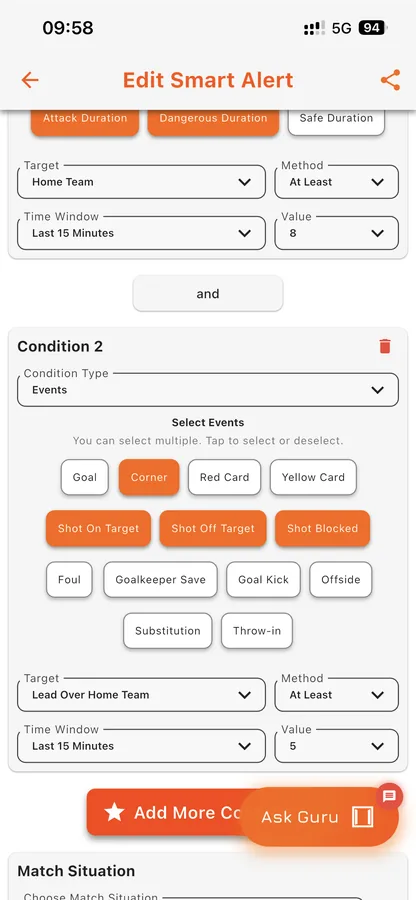
Standard alerts tell you what already happened. Goal Guru's Smart Notifications are built around the conditions that tend to precede a shift in the game. By tracking short-window attacking pressure and specific match situations, you can set custom, user-defined triggers that notify you exactly when a match is heating up.
The Science of Match Momentum
Football isn't just about possession; it's about pressure. Our community of analysts and fans use Goal Guru to track specific, notable scenarios that often precede a major event like a goal or a momentum shift. Here are the core patterns you can build your notification configurations around:
1. Spotting the Late Comeback
One of the most dramatic, closely-watched moments in football is the late surge. When a strong favourite or a home team is trailing in the final 15 to 20 minutes, they often throw everything forward. By setting alerts for 8+ offensive actions (shots, corners, dangerous attacks) or 35+ total attacks within a tight 15-minute window, you can be notified the moment a team is building sustained pressure for an equalizer.
2. Tracking Early Chaos
Sometimes a match goes off script immediately. An early red card in the first 20 minutes completely alters the tactical landscape, opening up spaces and changing the shape of the game. Similarly, a "goal rain" where 3 or more goals are scored in the first 25 minutes indicates a completely open, defensively fragile game. Setting alerts for these early anomalies ensures you never miss a chaotic fixture.
3. The Underdog Surprise
There is real analytical value in tracking matches where the script is flipped. If an underdog takes a shocking 2-goal lead in the first half, the dynamic of the second half often shifts: the stronger side on paper tends to attack relentlessly in search of a way back. Smart notifications can instantly flag these "Underdog Surprise" scenarios across hundreds of live games.
4. League-Specific Pressure Cookers
Different leagues have different rhythms. For example, in high-intensity leagues like the Premier League, a team registering 6+ shots in the last 10 minutes without scoring is a strong indicator that sustained pressure is building toward a goal. You can tailor your alerts to specific leagues, ensuring your criteria match the local style of play.
5. Alerting on Calculated Stats, Not Just Raw Events
Smart Alert conditions aren't limited to counting events like goals, shots, and corners. You can also build conditions on Goal Guru's calculated stats — Expected Goals (xG), xG inside and outside the box, possession, shot accuracy, goal conversion, and goalkeeper save rate. These are the same advanced metrics that power Guru Vision's predictions, now available as Smart Alert triggers of their own.
That opens up conditions a simple event counter can't express — notify me when a team's xG passes 1.5 without them having scored, or when the trailing team's xG overtakes the leading team's, or when a team's goal conversion rate crosses a threshold late in the game. These calculated-stat conditions combine with team, time window, and match situation filters exactly like any other Smart Alert.
6. Comparing the Two Teams Directly
Some questions are about balance, not totals: is one team running the game? Share conditions compare the two sides on the same stat only. "The home team has at least 80% of both teams' dangerous attacks" fires when the home side has 16 to the away side's 4 — whatever the match total is. You can point a share condition at the home team, the away team, the favourite, the underdog, or either team, and use it on events, situation counts, and situation time.
Share conditions are different from percentage conditions, which divide by every event or situation in the match rather than just the two teams' totals of the stat you picked — so their values run much lower. To ask "does one team have most of the dangerous attacks?", use a share. Our guide to share conditions walks through examples.
Three Kinds of Alerts
- Smart alerts watch every live match for your conditions — the builder above.
- Match alerts do the same for one match you pick: open the match, go to its Smart Alerts tab, and tap "Alert me for this match".
- Pre-match alerts work before kickoff, picking the upcoming matches that fit your conditions on predictions, form, head to head, and odds. See Pre-Match Alerts.
All three land in one alerts inbox, with a filter by kind, and every notification says which kind of alert sent it. Matches your alerts picked recently also appear in the Smart Matches strip on My Matches, each with the alert that picked it. And when an alert works well, share it in the Community chat — anyone can add a shared alert to their own list in one tap, within their plan's limits.
Stop Staring at Basic Stats
Don't rely on generic full-time possession stats that hide the true story of the game. Start tracking real, minute-by-minute momentum with Goal Guru's Smart Notifications and stay one step ahead of the action.