Football is a game of moments. Whether you are following a single team or tracking multiple matches across different leagues, the challenge is always the same: staying informed without being overwhelmed. Goal Guru is built around this problem, offering a flexible notification system that adapts to how closely you want to follow the game.
Event-Based Notifications
The simplest way to stay updated is through event notifications. After selecting your teams and leagues, you can choose exactly which match events trigger an alert — match start, goals, yellow and red cards, penalties, substitutions, half-time and full-time results, extra time, and match cancellations or postponements. Each event type can be enabled or disabled independently, so the alerts you receive reflect precisely what you care about and nothing more.
Smart Alerts: Multi-Condition Match Monitoring
For users who want deeper control, Smart Alerts allow you to define complex, multi-step conditions that trigger a notification only when all criteria are met simultaneously. Rather than alerting on a single event, Smart Alerts monitor patterns — combining event frequency, team targeting, time windows, and situation durations into a single, structured rule.
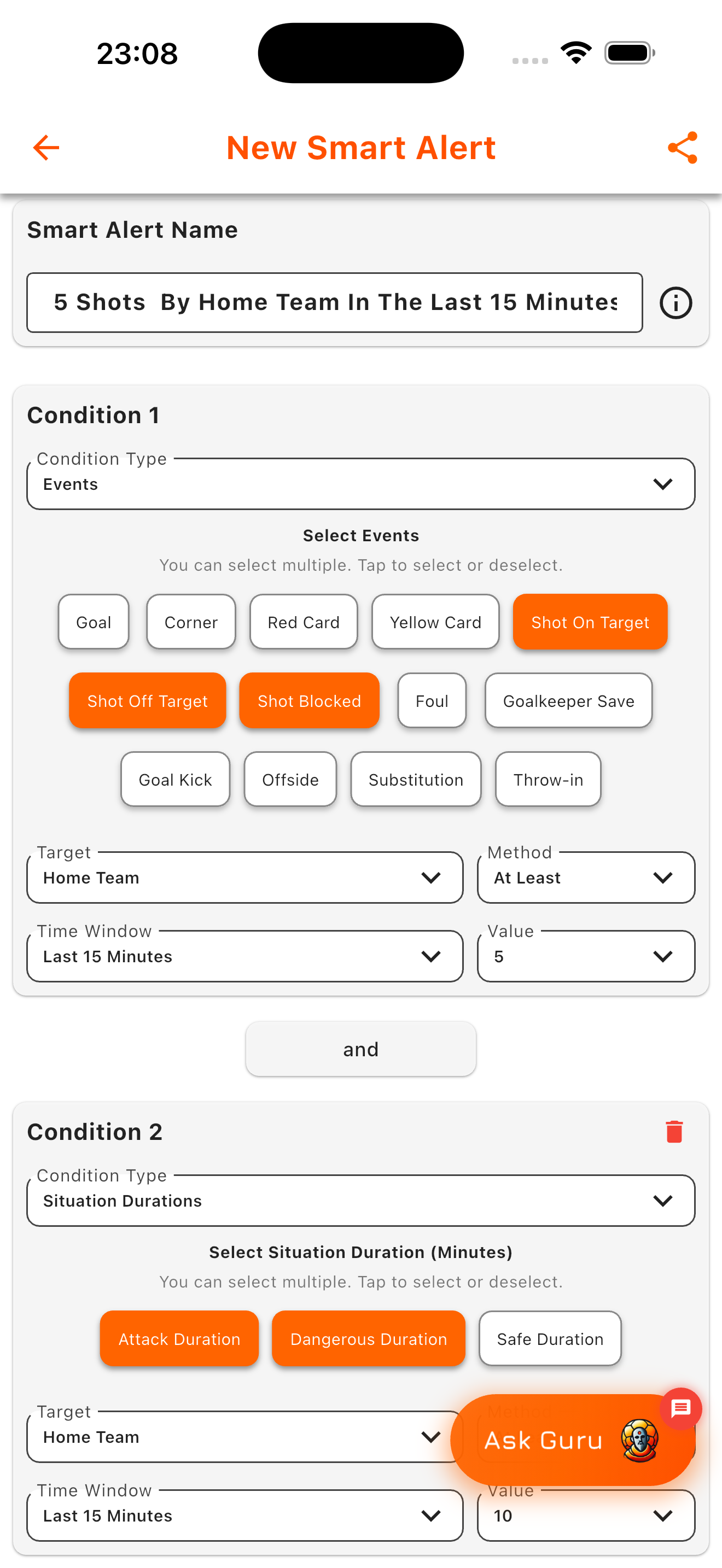
Creating a Smart Alert for complex match conditions in Goal Guru.
The example above shows a Smart Alert titled '5 Shots By Home Team In The Last 15 Minutes'. The first condition monitors shot events — on target, off target, and blocked — for the home team over a 15-minute rolling window, requiring at least five shots to have occurred. The second condition tracks situation duration, requiring that the home team has spent at least 10 minutes in attacking or dangerous situations during the same period. Both conditions must be satisfied before the alert fires.
Why Multi-Condition Alerts Matter
A single shot or a brief attack rarely signals a meaningful momentum shift. What makes a phase of play significant is its continuity — sustained pressure, repeated entries into the final third, and a defensive side forced to respond repeatedly. Smart Alerts are built to surface these phases rather than isolated events. By combining event counts with situation durations, they filter out noise and highlight moments where pressure has genuinely accumulated.
Setting up a Smart Alert follows a straightforward process: name the alert, add one or more conditions by selecting event types or situation categories, define the target team, time window, and threshold for each condition, then save and activate. Goal Guru monitors every live match against these criteria and delivers a notification the moment the pattern appears.
Whether you prefer basic event updates or want to track nuanced match dynamics across multiple games, the notification system is designed to surface the moments that matter — on your terms.