In many matches, one team enters as the favourite — based on form, quality, or market expectation. However, being the favourite on paper does not always translate into control on the pitch. Favourite Team Difference Events are designed to measure whether the expected stronger side is actually asserting dominance during the match.
This alert focuses on attacking actions that reflect pressure and intent rather than isolated moments. Events such as shots on target, shots off target, blocked shots, and corners are tracked specifically for the favourite team during the active half.
The alert is triggered when the favourite team records at least 10 more of these events than their opponent in the current half. In practical terms, this means the favourite side is consistently spending more time attacking, forcing defensive actions, and keeping pressure inside the opposition’s half.
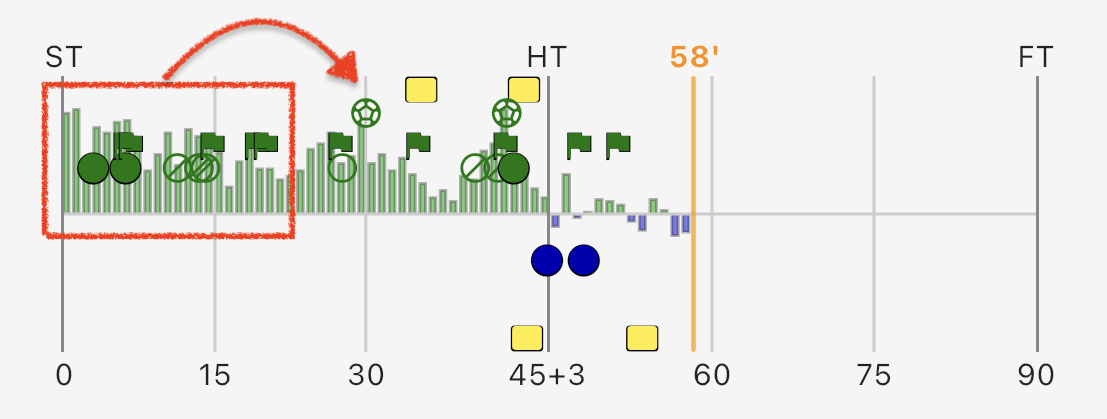
Real-time monitoring of Lead Over Favourite Team Difference Events.
As seen in the example above, the alert notifies users when the favourite team (in this case, Manchester City) has built a significant event advantage over their opponent (Leeds) during the first 20 minutes of the match.
It is clear from the event counts that City has generated at least 10 more attacking actions than Leeds. The red highlight on the event graph shows the relevant period where this difference has accumulated.
In the case, user will receive an alert indicating that Manchester City is outperforming Leeds in terms of attacking events in the minute 20 and as shown in the graph, this pressure leads to a goal shortly after in the minute 30.
Unlike single-event alerts, this approach emphasizes accumulation. A single shot or corner can be random, but a growing gap in total attacking events often indicates territorial control and sustained momentum.
Monitoring Favourite Team Difference Events is especially useful for understanding whether a match is following its expected narrative. When the favourite builds a clear event advantage early, it often signals that chances, goals, or tactical adjustments are likely to follow.
By focusing on the active half only, the alert remains responsive to changing match dynamics. Momentum can shift quickly in football, and this alert helps highlight when the favourite team is actively pushing the game in their favor right now — not just over the full match.
Configure Lead Over Favourite Team Events Smart Alert
Below you can find step-by-step instructions to set up the Lead Over Favourite Team Events Smart Alert in the Goal Guru application. You can customize the parameters based on your preferences and the leagues you follow.
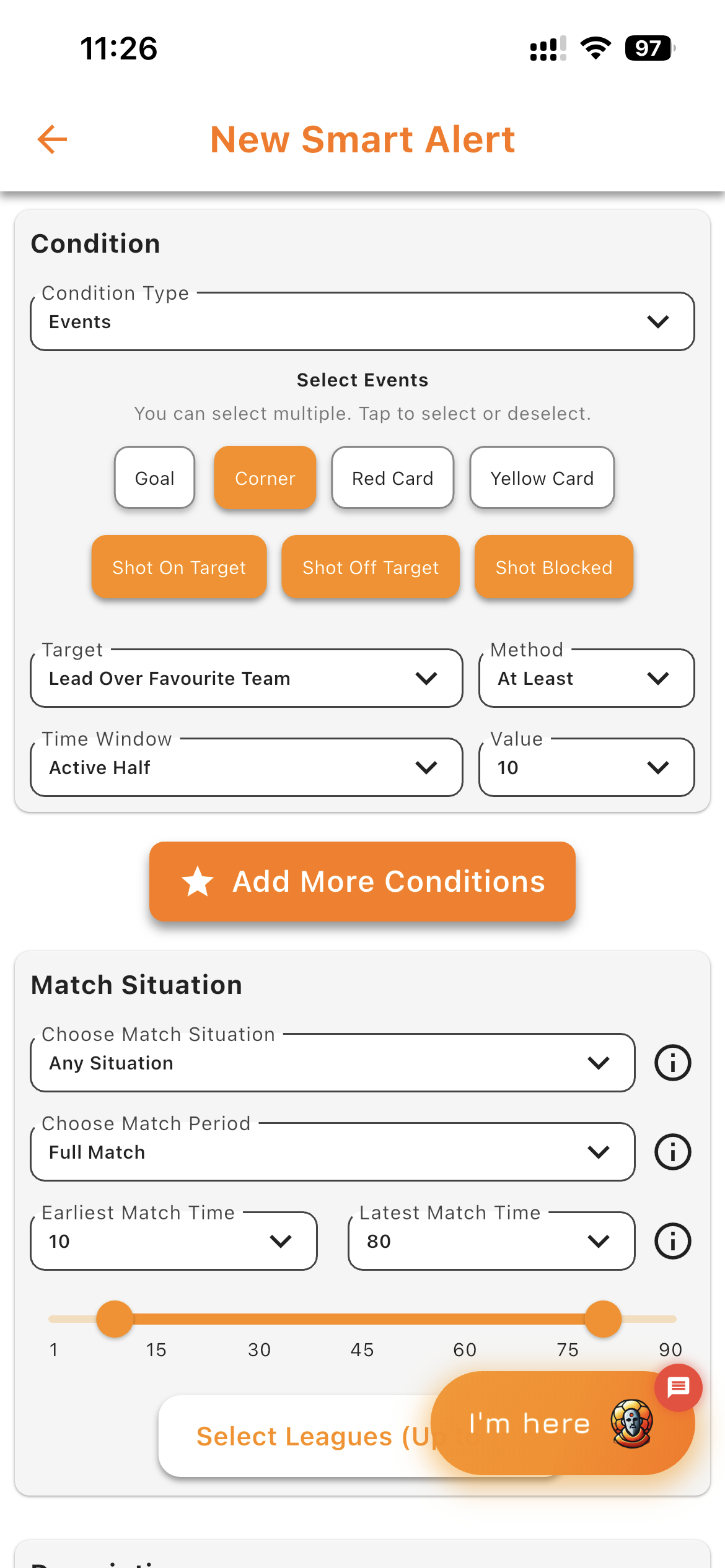
Generation of the Smart Alert for Lead Over Favourite Team Events.
1. Open the Goal Guru app and navigate to the Smart Alerts section.
2. Select 'Events' as the condition type.
3. Set the event types to track: Shots on Target, Shots off Target, Blocked Shots, and Corners.
4. Select the target as 'Lead Over Favourite Team' and set the time window to 'Active Half'.
5. Define the threshold as 'At Least 10 Events'.
6. If you wish, limit the match minutes for the alert to be active. In this case, the alert is set to monitor from minute 10 to minute 80 of the match to avoid early noise and end-of-match fatigue periods.
7. You can also choose to which leagues this alert applies.
8. Finally, click 'Save' to create the Smart Alert.